

 4.2
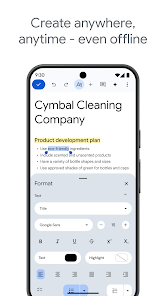
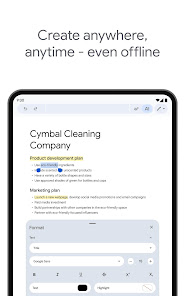
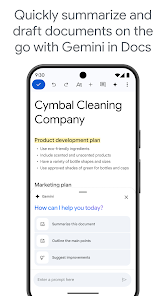
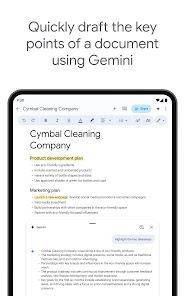
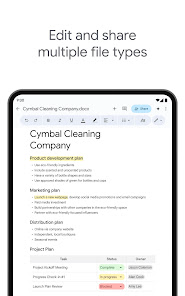
4.2 Google Docs is becoming more and more popular as a way to collaborate on documents with friends and colleagues. If you don't have a computer, and need to do your writing somewhere else, there are still options! Google has created a mobile app for Android and iOS that lets you work on docs anywhere, even without an internet connection.
Google Docs has revolutionized the way we create and collaborate on documents, and its robust features make it an essential tool for anyone who writes. Here are some core highlights that truly set it apart:
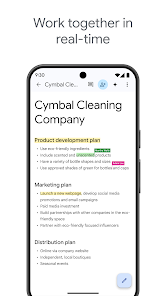
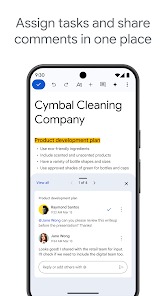
In my daily life, Google Docs has become an indispensable tool. I use it for everything from drafting personal letters to collaborating on work projects. One specific scenario that stands out was when I was part of a team tasked with creating a marketing strategy. We set up a shared document where everyone could contribute their ideas. It was incredibly efficient, as we could see changes in real time and discuss strategies via comments embedded within the text. This level of collaboration would have been impossible with traditional word processors.
The user interface of Google Docs is clean and intuitive, making it easy to navigate. I appreciate how all the tools are neatly organized, with most functions accessible in a single click. The document editing workflow is seamless, and I find that the performance is reliable, even when multiple people are editing at the same time. The ability to leave comments and suggestions is a game changer, allowing for constructive feedback without altering the original text. Overall, my experience with Google Docs has been overwhelmingly positive, as it streamlines my writing process and enhances collaboration.
Google Docs is available for free, which is a significant advantage over many other word processing software options. While there are premium features available through Google Workspace, the basic functionalities are sufficient for most users, making it an accessible choice for students, professionals, and anyone in between. The premium options do offer additional storage and administrative features, which can be beneficial for larger teams or businesses.
Google consistently updates Docs with new features and improvements, ensuring that users have access to the latest tools. I’ve noticed enhancements that streamline the editing process and improve collaboration features over time. Additionally, Google provides extensive support through help centers and forums, where I’ve found answers to my questions quickly. The community around Google Docs is also vibrant, with users sharing tips and tricks that make using the app even more effective.
As an American user, security and privacy are paramount when choosing any app, and Google Docs is no exception. The app is available on official sources like the Google Play Store and the App Store, ensuring a level of trustworthiness. When signing up, Google requires basic personal data such as an email address, which is standard practice. However, it’s important to note that Google uses this data to provide personalized experiences and advertisements, which some users may find intrusive.
Moreover, Google Docs has robust security measures in place, including encryption for data at rest and in transit. This means that my documents are well-protected from unauthorized access. However, I always recommend being cautious about sharing sensitive information through any online platform. Google also allows users to manage their privacy settings, providing options to limit data sharing and control what information is used for advertising purposes. Overall, I feel confident using Google Docs, knowing that my information is secured while still being accessible for my productivity needs.

 Collaborate in real-time with team members easily. Access your documents from any device, anytime. Automatic saving prevents data loss and ensures security. Intuitive interface makes document editing simple and fast. Seamless integration with other Google services enhances productivity.
 Limited offline functionality can hinder productivity. Formatting issues may arise when exporting documents. Collaboration can lead to version control challenges. Privacy concerns regarding data storage and sharing.
 Yes, Google Docs collects user data as outlined in Google's privacy policy, which may include information like your email address and usage statistics.
Google Docs offers a free version that is available to anyone with a Google account, allowing users to access basic features without a subscription.
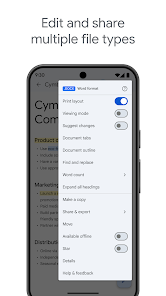
While an internet connection is required for most features, Google Docs does offer an offline mode that allows users to create and edit documents without being connected to the internet.
You can contact Google Docs support through the Help menu within the app, or visit the Google Docs Help Center online to find resources and submit feedback.
You can manage or cancel your Google Docs subscription through your Google Account settings by navigating to the "Subscriptions" section.
Yes, you can use Google Docs offline by enabling Offline Mode in Google Drive settings. Make sure to install Google Docs Offline extension.
Go to your Google Account settings, select "Security," then "Password," and follow the prompts to change your password.
You can reach Google Docs customer service through the Google Support website or by visiting the Help Center. Look for the "Contact Us" option for further assistance.
Visit the Google Account Recovery page and follow the prompts to reset your password or recover your account.
To delete your Google Docs account, you must delete your entire Google Account through your Google Account settings.











 Home
Home  Apps
Apps  Games
Games  Disclaimer
  Privacy & Policy
  Terms of Service
  Google Play
  App Store