



 4.1
4.1 Venmo has revolutionized the way we handle payments among friends and family. The app is not only user-friendly but also packed with features that enhance the payment experience. Here are some of the core highlights that make Venmo stand out:
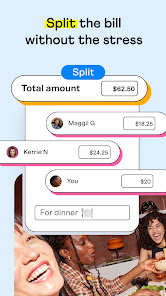
Using Venmo has become an integral part of my daily life. Whether I’m catching up with friends over dinner or planning a weekend getaway, the app simplifies the payment process. For example, just last week, I went out for brunch with a group of friends. After the meal, instead of fumbling with cash or having to calculate who owes what, we just let the app do the math. Everyone sent their share in seconds, and I was able to transfer the total amount to the restaurant with just a few taps. This seamless experience made the outing much more enjoyable, allowing us to focus on the fun instead of the finances.
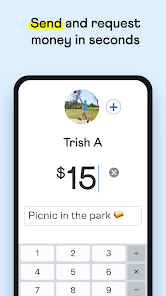
When it comes to the user interface, Venmo is incredibly intuitive. The app is clean, visually appealing, and easy to navigate. I appreciate how quickly I can access my transactions; everything is laid out in a user-friendly manner, making it simple to send or request money. The workflow is smooth; within moments, I can send or request money, add notes, and even select emojis to express the occasion. Performance-wise, I’ve never faced any significant lag or technical issues, which is quite impressive for a financial transaction app. Overall, using Venmo feels like a breeze, and I find myself reaching for it frequently without any hesitation.
Venmo is free to use for basic transactions, which is fantastic for casual users like me. However, there is a small fee for instant transfers to your bank account, typically around 1.75%. I find this reasonable, especially considering the convenience it offers. Additionally, there are no charges for sending money using your Venmo balance or linked bank account, making it a cost-effective option for most users.
Venmo frequently updates its app to enhance functionality and security. I’ve noticed improvements over time, such as better integration with various banks and enhanced user features. The customer support is responsive as well; I once had a question regarding a transaction, and I reached out via the app’s help section. I received a clear and prompt response, which left me feeling valued as a user. It’s reassuring to know that they prioritize user experience and support.
As an American user, security and privacy are paramount when dealing with financial apps like Venmo. The app is available on both the App Store and Google Play, adhering to strict guidelines for app security. When registering, Venmo requires basic personal information, such as your name, email, and phone number, which is standard for financial applications. I appreciate their commitment to protecting my data through encryption and two-factor authentication, which adds an extra layer of security.
However, it’s worth noting that Venmo does track user activity for advertising purposes. While I understand the need for ads to support free apps, I prefer transparency about how my data is being used. Venmo provides options to adjust privacy settings, allowing users to control who can see their transactions. This feature is crucial for anyone concerned about their financial privacy. Overall, while no app is entirely without risk, I feel comfortable using Venmo, thanks to their robust security measures and privacy controls.

 Instant money transfers between friends and family User-friendly interface for easy navigation Social feed to track payments and activities No fees for standard transactions Compatible with multiple banks and cards
 Limited to domestic transactions only Lacks buyer protection for purchases May incur fees for instant transfers Privacy settings can be confusing to manage
 Yes, Venmo collects personal data such as your name, email address, phone number, and transaction history to facilitate transactions and improve service.
Venmo does not offer a subscription service with a free trial, but the app itself is free to download and use for standard peer-to-peer transactions.
Yes, Venmo requires an internet connection to function, as it relies on online servers to process transactions and connect users.
You can contact Venmo support through the app by accessing the Help section, or by visiting the Venmo website and using the contact options available for assistance and feedback.
Since Venmo does not have a subscription model for general usage, there is no subscription to manage or cancel. However, users can manage their Instant Transfer settings through the app.
You can reach Venmo customer service through the app or by visiting their website for support options. They typically provide help through email and chat.
To activate your Venmo account, download the app, sign up with your email or phone number, and follow the prompts to verify your identity.
Open the Venmo app, enter your email or phone number, and your password to log in. If you’ve forgotten your password, you can reset it through the app.
Venmo does not offer a direct customer service phone number; instead, they provide support through their app and website.














 Home
Home  Apps
Apps  Games
Games  Disclaimer
  Privacy & Policy
  Terms of Service
  Google Play
  App Store